Free Excel download · no email
Free landed cost calculator spreadsheet template
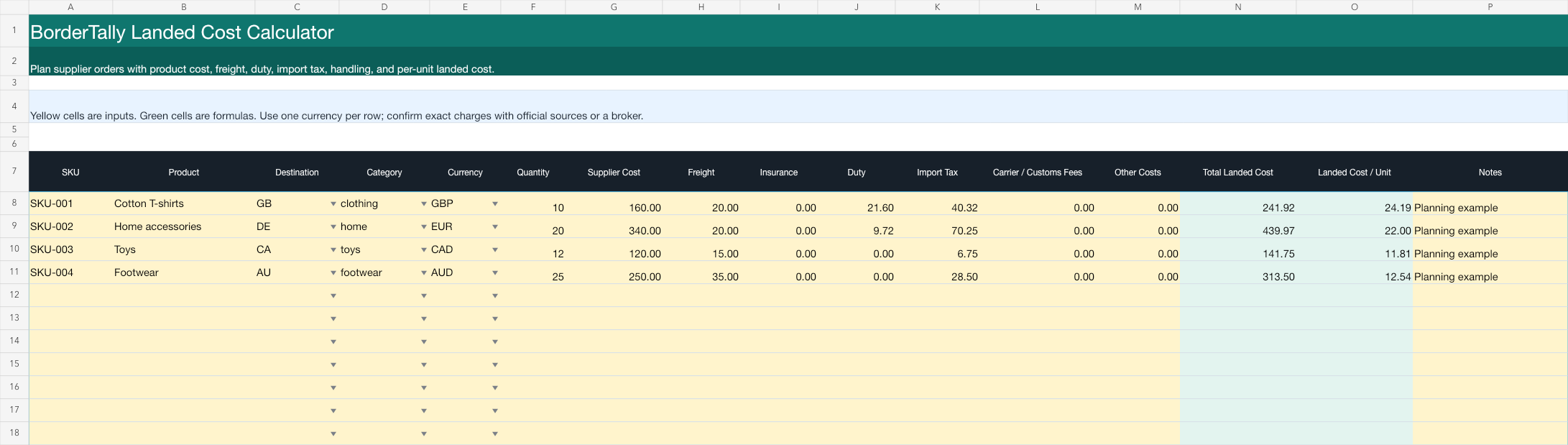
Compare supplier orders with product cost, freight, insurance, duty, import tax, handling, total landed cost, and landed cost per unit in one auditable workbook. Formulas and four worked examples are included.
Formula
What the spreadsheet calculates
The template keeps each cost visible instead of hiding assumptions in one opaque number. It sums the costs you enter, then divides the total by quantity.
Supplier costFreightInsuranceDutyImport taxCarrier / customs feesOther costsLanded cost per unit = total landed cost ÷ quantity
Workflow
From supplier sheet to a usable planning number
- 1 Download and replace the examples. Enter SKU, destination, category, currency, quantity, supplier cost, freight, and insurance.
- 2 Estimate duty and import tax. Run up to five rows in the free online preview, then paste those estimates into the yellow cells.
- 3 Add the costs your business actually pays. Include broker, carrier, customs-clearance, storage, inspection, or payment fees where relevant.
- 4 Review the green outputs. The workbook calculates total landed cost and per-unit landed cost for each product row.
- 5 Scale the same workflow. Copy the headerless rows from the BorderTally Import sheet into Pro when the job grows beyond five rows.
Worked example
A £160 UK clothing order
For a planning example with £160 supplier cost, £20 freight, £21.60 simplified duty, and £40.32 import VAT, the template produces an estimated total landed cost of £241.92. At 10 units, the estimated landed cost per unit is £24.19.
- Supplier cost
- £160.00
- Freight
- £20.00
- Duty
- £21.60
- Import VAT
- £40.32
- Estimated total
- £241.92
Important limits
A planning workbook, not a customs ruling
The spreadsheet totals the numbers you enter; it does not classify products or guarantee a carrier invoice. Exact duty and tax depend on commodity code, origin, valuation, reliefs, transport, trade measures, entry fees, and current authority treatment.
BorderTally's online calculator uses simplified, source-tagged country rules. U.S. rows currently require shipment-specific manual review rather than an invented numeric total. Read the methodology and limitations before relying on an estimate.
Landed cost spreadsheet FAQ
Is the landed cost spreadsheet really free?
Yes. The Excel workbook is free to download without an email address, account, or payment details.
Does the spreadsheet calculate exact customs duty?
No. It adds the duty and import-tax estimates you enter to the other landed-cost inputs. BorderTally's free five-row preview can produce simplified planning estimates, but exact charges depend on classification, origin, reliefs, carrier fees, and current authority treatment.
Can I open the template in Google Sheets?
Yes. Upload the .xlsx file to Google Drive and open it with Google Sheets. The total landed cost and per-unit formulas use standard spreadsheet functions.
Can I use multiple currencies in one workbook?
Yes, but each product row should use one currency consistently. The template does not perform foreign-exchange conversion.
Can I paste the template into BorderTally Pro?
Yes. The BorderTally Import sheet mirrors destination, supplier cost, freight, and category as four headerless columns ready to copy into the free preview or Pro tool.
Start with five rows
Put real estimates into the workbook
Paste destination, price, shipping, and category into the free preview. No email or payment details required.